
How to Audit Your Blog SEO and Find Content Gaps

You have published articles, researched keywords, and tried to follow SEO advice. But you are not sure which posts are helping your site grow, which ones are sitting unread, and what you should be working on next.
That uncertainty is common and it is solvable. A blog SEO audit gives you a structured way to move from guessing to evidence-based decisions about where to focus your effort.
What's In This Post
ToggleAuditing your blog SEO is not the same as checking whether your keywords appear in your headings. A useful audit examines what your existing content is actually doing in search, whether your pages can be found and indexed, whether you are covering the topics your audience needs, and how your posts connect to each other. It surfaces problems you can fix, opportunities you have not yet addressed, and a clearer picture of what to prioritise.
This guide covers a practical eight-step process for auditing a blog, finding content gaps, and turning your findings into a prioritised action plan.
One important note before you start: no audit can guarantee rankings or traffic increases. An audit helps you make better-informed decisions. What you do with those decisions, and how search engines respond to the changes you make, involves factors beyond any checklist.
What Is a Blog SEO Audit?
A blog SEO audit is a structured review of your website’s search visibility, content, technical accessibility, and internal organisation. Its purpose is to identify issues and opportunities so you can direct your effort toward what is most likely to help.
A thorough audit covers four connected areas.
Content audit: Are your existing articles useful, accurate, relevant, and worth improving? Do they meet the needs of the readers they are intended to serve?
Keyword and content gap analysis: Are you covering the topics your audience needs? Are your pages aligned with what searchers are actually looking for?
On-page and site structure review: Can readers and search engines understand how your pages relate to each other? Are your most important pages easy to find and navigate?
Technical SEO review: Can search engines access and index the pages you want to appear in search results? Are there crawling or indexing issues preventing visibility?
These four areas overlap. A content problem and a technical problem can produce similar symptoms but require different solutions. A content audit alone will not reveal indexing errors. A technical audit alone will not tell you whether your content is meeting reader needs. Understanding the distinction helps you diagnose problems rather than applying generic fixes.
Step 1: Create an Inventory of Your Existing Blog Content
Before you decide what to improve or create, establish what you already have.
Collect Your Published URLs
Export your published posts and pages from WordPress, your XML sitemap, a crawling tool, or a combination of sources. If you use more than one source, consolidate the list and remove duplicates. Include important landing pages and category pages where they are relevant to your content strategy, not only blog posts.
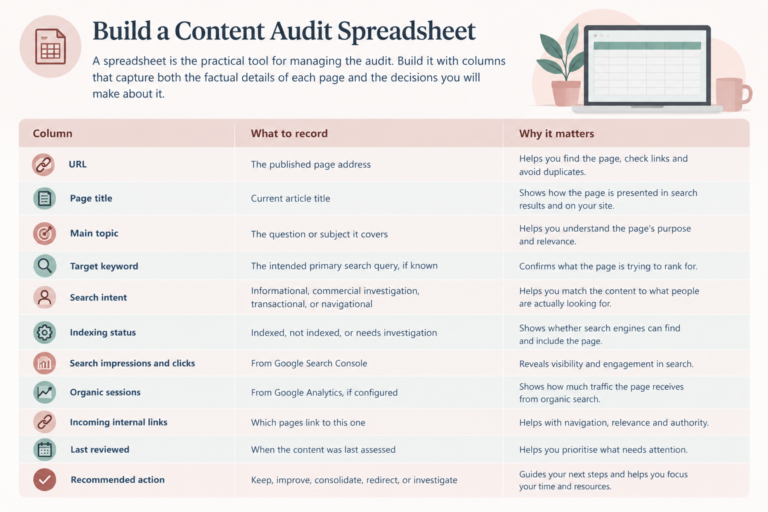
Build a Content Audit Spreadsheet
A spreadsheet helps you manage your content audit in one place. Record the details of each page, review its performance and decide what action to take next.
| Column | What to record |
|---|---|
| URL | The published page address. |
| Page title | The current article title. |
| Main topic | The question or subject the article covers. |
| Target keyword | The intended primary search query, if known. |
| Search intent | Informational, commercial investigation, transactional or navigational. |
| Indexing status | Indexed, not indexed or needs investigation. |
| Search impressions and clicks | Performance data from Google Search Console. |
| Organic sessions | Organic search sessions from Google Analytics, if configured. |
| Incoming internal links | Which other pages on your website link to this page. |
| Last reviewed | The date the content was last assessed. |
| Recommended action | Keep, improve, consolidate, redirect or investigate. |
Tip: Once your spreadsheet is complete, prioritise pages based on their performance, usefulness, accuracy and strategic value. Avoid updating or deleting content based on traffic figures alone.
Use Google Search Console to Find Existing Search Performance
Open the Search Results performance report. Select a date range that gives you enough data to see patterns, typically at least three months. Enable the clicks, impressions, click-through rate, and average position columns if they are not already visible.
Review the Pages tab to see which of your posts are generating impressions and clicks from Google Search. Review the Queries tab to see which search terms are sending people to your site. Switching between these two views reveals both which posts are visible and what people are searching for when they find them.
Practical example: An article about morning routines might receive impressions for several related queries but very few clicks. Before rewriting the title, check the search results for those queries, what position the article is ranking at, and whether the page actually addresses what searchers are looking for. A low click-through rate can have multiple causes. The title is one factor. Ranking position, search features, and competition also influence clicks.
Step 2: Identify Which Existing Articles Need Attention
With your inventory populated, assess each article individually rather than drawing general conclusions about the whole blog.
Find Articles With Impressions but Few Clicks
An article with impressions but a low click-through rate is visible in search results but not prompting clicks. Check whether the title and meta description accurately communicate the article’s value. Compare the page’s actual topic with the queries generating impressions. Sometimes an article is receiving impressions for searches it only partially addresses, which is a targeting issue rather than a presentation issue.
Do not assume a low click-through rate is automatically a title problem. Ranking position, query intent, and the nature of the search results page all influence click behaviour.
Find Articles With Little or No Search Visibility
An article with very few impressions and no meaningful clicks is not visible in relevant searches. Before rewriting the content, check whether the page is indexed, whether it targets a topic with genuine search demand, and whether the content meets the reader’s needs.
If the page is not indexed, a technical or discovery issue is the priority. Rewriting the content will not resolve a crawling or indexing problem.
Identify Content That Is Outdated or Incomplete
Review your existing posts for incorrect or outdated information, broken links, missing steps or examples, questions the article does not answer, and advice that no longer reflects current practice or tools. Update content when there is a meaningful improvement to make, not simply to refresh the publication date without substantive changes.
Decide What to Do With Each Page
Keep: The page serves its intended purpose and remains useful and relevant.
Update: The page has useful foundations but needs better coverage, clearer explanation, more accurate information, or stronger targeting.
Consolidate: Two or more pages serve substantially overlapping purposes and a single stronger resource would better serve the reader. Assess redirects and URL changes carefully before implementing consolidation.
Investigate: The page has indexing, technical, performance, or strategic issues that need diagnosis before deciding its future.
Do not remove a page simply because it has low traffic. Consider its purpose, quality, incoming links, conversions, and relevance first.
Step 3: Review Your Keyword Targeting
The objective of this step is to ensure each important page has a clear purpose and targets a search need it can genuinely satisfy.
Check Whether Each Article Has a Clear Primary Topic
For each URL, record the main question it answers and the primary search phrase you intend to target. A page can rank for many related queries, so this is not about assigning exactly one keyword to every post. It is about avoiding vague positioning where a post has no clear focus, and avoiding unnecessary duplication where two posts are trying to serve the same reader need.
Compare Your Target Keywords With Actual Search Queries
Use Search Console to discover the queries for which your pages already receive impressions. Look for relevant queries your article only partially addresses, unexpected but useful search terms you could develop further, questions that deserve more detailed treatment within an existing post, and queries that may belong to a different page because the intent differs.
Check Search Intent and the Current Search Results
Search your target query and examine the pages currently ranking. Ask whether searchers are looking for a tutorial, a checklist, a comparison, a definition, or something else entirely. Ask whether your page delivers the format and level of detail the searcher needs. Ask whether the query is too broad for what your article covers.
Use the results to understand what readers expect from the query. Then develop your own useful and accurate response rather than copying the structure or content of competing pages.
Step 4: Find Content Gaps and Missing Topics
A content gap is a relevant topic, question, or need that your current content does not adequately cover.
Find Questions Your Existing Articles Do Not Answer
Review Search Console queries, reader comments, questions from your audience, and relevant discussions in communities where your readers spend time. Group related questions into topic clusters rather than creating a separate post for every small variation of the same question.
Compare Your Coverage With Relevant Competitors
Choose websites that compete for the same audience or search topics. Compare the topics they cover that your site does not. Look for important subtopics missing from your existing articles. Consider formats you have not yet used, such as comparisons, worked examples, checklists, or templates.
A competitor covering a topic does not automatically mean you should publish it. Prioritise gaps that fit your audience and your website’s purpose rather than pursuing topics simply because someone else covers them.
Find Gaps Within Your Existing Topic Clusters
Look at the topics you have already written about and identify where the coverage is incomplete. A blog about blogging and online income might have an article on keyword research but no supporting guide on how to map keywords to existing pages, or how to audit internal links.
A topic cluster around blog SEO and content strategy might include keyword research, content planning, blog SEO audits, internal linking, content updates, and measuring search performance. Each article can serve a distinct reader need while supporting the others through internal links.
HerDailySpace’s existing money and online business content creates natural opportunities for gap analysis. The articles on choosing an online business, making the first $1,000, and freelancing versus blogging each serve a distinct purpose. The gaps might include more detailed guidance on specific platforms, step-by-step implementation guides for particular income streams, or audience-specific content for readers at different stages.
Prioritise Gaps by Relevance and Opportunity
For each potential topic, assess audience relevance, whether it fits your website’s main subject and goals, whether it is already adequately covered elsewhere on your site, whether there is evidence of relevant search demand or reader interest, and whether you can create something genuinely useful and accurate.
Treat keyword difficulty scores from third-party tools as estimates rather than definitive measures. Validate potential topics by looking at the actual search results before deciding whether the opportunity is realistic for your current site.
Step 5: Find Keyword Overlap and Content Gaps in Your Own Strategy
Two pages targeting very similar search intent can create confusion about which page should rank for a given query. Similar keyword phrases alone do not confirm this is happening, but it is worth checking.
Identify Pages That Target the Same Reader Need
Compare page titles, main topics, target queries, and actual Search Console performance across your posts. Look for posts where the intended audience and the question being answered are so similar that one post might be undermining the other.
As a practical example, consider three articles that might appear on a blog like HerDailySpace:
How to Choose the Right Way to Make Money Online for You addresses the decision between business models.
How to Make Money Online When You Have No Idea Where to Start addresses the experience of overwhelm and the first steps.
Your First $1,000 Online: A Realistic Plan for Beginners addresses planning the route to a specific revenue milestone.
These are related topics but distinct reader needs. The solution may be to clarify each article’s scope, strengthen the internal links between them, and ensure each one has a clearly defined purpose rather than consolidating them into one post.
Create a Simple Topic-to-URL Map
A topic-to-URL map assigns each major topic to a primary page on your website. Use it to spot overlapping content, clarify each article's purpose and identify topics that still need coverage.
| Target topic | Intended page | Status |
|---|---|---|
| Blog SEO audit process | /blog-seo-audit-content-gaps/ | Primary article |
| Finding content gaps | Covered within the audit article above | Supporting section |
| Fixing low blog traffic | /why-is-my-blog-not-getting-traffic/ | Diagnostic article |
| Internal linking strategy | To be written | Gap identified |
Remember: This is a working document, not a rigid one-keyword-per-page rule. Update it as you publish, improve or consolidate content. Similar topics can share a page when they serve the same search intent.
Step 6: Audit Internal Links and Site Structure
Internal links help readers navigate your content and help search engines discover pages and understand their relationship to each other. Google’s documentation recommends using crawlable links with descriptive anchor text. A page that no other page on your site links to receives less crawl attention and is harder for readers to discover.
Check Whether Important Pages Have Relevant Internal Links
For each important page on your site, identify which existing articles naturally relate to it, whether adding a link would genuinely help a reader continue their research, and whether the anchor text describes the destination accurately.
When you publish a new post, link to it from two or three relevant existing posts where the connection is genuinely useful. Use anchor text that describes what the reader will find at the destination rather than generic phrases.
Review Categories, Navigation, and Topic Relationships
Check whether your categories have a clear purpose and whether related articles are grouped logically. Check whether important content is easy to find from the homepage or main navigation. Consider whether multiple category or tag archives are creating unnecessary duplication without adding reader value.
Do not restructure an established site simply to change its URL hierarchy. Make structural changes when they address a specific usability or discoverability problem.
Check for Orphan Pages and Broken Links
An orphan page has no internal links pointing to it from anywhere else on your site. Identify whether each orphan page is important and where a contextual link from a related article could be added.
Check for broken internal links, incorrect destination URLs, and unnecessary redirect chains. These create a poor experience for readers and can affect how search engines crawl your site.
Step 7: Check the Technical SEO Basics
Technical SEO covers the foundational factors that determine whether search engines can access, crawl, and index your pages correctly. Keep technical checks practical and focus first on issues that affect visibility.
Check Indexing and Crawlability
Use Google Search Console’s URL Inspection tool to examine important pages individually. For each URL, check whether the page is indexed, whether crawling is blocked by a robots.txt directive, whether there is an accidental noindex tag in the page code or WordPress settings, whether the canonical URL is pointing to the correct preferred page, and whether there are server errors or unexpected redirects.
Submitting an XML sitemap to Search Console helps Google discover your URLs, but submitting a sitemap does not guarantee that those pages will be indexed. Google’s own documentation is clear that discovery and indexing are separate processes.
If a page is not indexed, investigate the technical cause before spending time improving the content. Improving content that Google cannot access will not resolve the visibility problem.
Review Page Titles, Headings, and Metadata
Check that important pages have descriptive title tags and clear H1 headings that accurately reflect the content. Meta descriptions can help communicate a page’s value in search results, but Google may generate a different snippet regardless of what you write. Write meta descriptions that are accurate and useful rather than designed to trigger a particular display.
Check Mobile Usability and Page Experience
Review whether your content is readable and usable on mobile devices. Check that navigation works, links are easy to tap, images load correctly, and the layout does not break on smaller screens. Review Core Web Vitals data in Search Console where it is available and relevant.
Do not assume that every speed issue is directly causing poor rankings. Fix usability problems because they affect the reader experience, not only because of their potential SEO impact.
Review Images and Structured Data Where Relevant
Use descriptive and accurate alternative text for meaningful images. Avoid stuffing keyword phrases into image alt text where they do not accurately describe the image. If you use structured data markup, ensure it accurately represents the visible content of the page and follows Google’s current requirements.
Step 8: Turn Your Findings Into a Prioritised Action Plan
A useful audit does not end with a spreadsheet of problems. It ends with a clear order of work.
Prioritise by Impact, Effort, and Confidence
For each issue identified, assess its impact if confirmed, the effort required to address it, and the confidence you have that the proposed fix addresses the actual problem.
How to Prioritise Your SEO Fixes
Not every issue needs immediate attention. Use this guide to identify problems that may have the greatest impact and decide what to investigate first.
| Priority | Example finding | Recommended action |
|---|---|---|
| High | An important page is not indexed due to a noindex tag. | Investigate the directive and correct it if the page is intended to appear in search results. |
| High | A core article does not match the search intent of its target query. | Review the search results and improve the content and targeting where appropriate. |
| Medium | Related articles have few internal links between them. | Add relevant contextual links where they help readers discover related content. |
| Medium | An important reader question is not covered on the site. | Research the topic and plan a useful new article if it fills a genuine content gap. |
| Lower | A minor formatting inconsistency has no meaningful usability impact. | Schedule the correction alongside routine website maintenance. |
Important: These priority levels are illustrative. Assess each issue in context, including page importance, user impact and business goals. A noindex directive is not an error when a page is intentionally excluded from search results.
These are illustrative priorities. The actual order depends on the severity of each issue, its importance to your business goals, the effort required, and the evidence supporting the proposed fix.
Fix critical indexing and accessibility problems before spending time polishing content. For content opportunities, prioritise work that best serves your audience rather than chasing incremental metric improvements.
Measure Results After Making Changes
Record the date of each change and what specifically was changed. Review Search Console data over an appropriate period after making changes, allowing for normal fluctuations and the time it takes for Google to recrawl and reindex updated pages.
Google notes that the effects of SEO changes can take different amounts of time, sometimes weeks or months, and that some changes may not produce noticeable results. Interpret your metrics over time rather than drawing conclusions from a few days of data.
Your Blog SEO Audit Checklist
Work through these steps in order. Tick each item as you complete it to keep track of your audit progress.
Remember: You don't need to fix everything at once. Prioritise issues according to their impact, the importance of the page and the evidence you have gathered.
A Realistic 30-Day Audit Action Plan
Week 1: Diagnose
Export your URL list and begin the content inventory spreadsheet. Check your five to ten most important posts in Google Search Console. Record which pages are indexed, which have impressions but few clicks, and which have little visibility. Identify the three most significant patterns in what you find.
Week 2: Improve Content and SEO
Choose three to five priority articles based on what the diagnostics revealed. Improve search intent alignment in articles that are indexed but receiving few clicks. Update any content that is factually outdated or missing important steps. Add internal links to posts that have no meaningful incoming links from the rest of the site.
Week 3: Address Gaps and Distribution
Create a topic-to-URL map for your most important subject areas. Identify the two or three most significant content gaps. Plan one new article to address the most relevant gap. Create or update Pinterest pins for two or three existing posts that would benefit from better distribution.
Week 4: Review and Prioritise
Compare Search Console data with your starting point. Record what changed and what did not. Identify the highest priority action for the following month. Update your audit spreadsheet with the current status of each finding.
Thirty days is enough time to complete the diagnostic work and begin meaningful improvements. Meaningful changes in organic search visibility typically take longer to confirm.
When to Get Professional Help
Working through the steps above is achievable for most bloggers. There are situations where a professional review is more appropriate.
When your site has a large number of pages and prioritising the work is genuinely difficult. When indexing issues persist and the cause is not clear from the standard checks. When several articles overlap and the content strategy has become fragmented. When organic traffic has declined significantly and you need to identify the affected pages and queries systematically. When you want a structured plan with clear priorities rather than a long list of possible improvements.
A professional audit should explain the evidence behind each recommendation and distinguish confirmed technical problems from strategic opportunities. It should tell you what to fix first and why, not simply what could theoretically be improved.
Not sure what is holding your blog back?
A clearer strategy starts with understanding what is already working, where the gaps are, and which improvements deserve your attention first.
A professional review can help you assess your website, SEO, and content strategy, identify the most relevant opportunities, and build a prioritised action plan.
FAQ
What is a blog SEO audit?
A structured review of a blog’s content, keyword targeting, internal links, site structure, and technical SEO to identify issues and opportunities. The goal is to understand what is working, what needs attention, and what to prioritise next.
How often should I audit my blog SEO?
There is no universal schedule. Review performance and technical health regularly, and carry out a more comprehensive audit when the site grows significantly, the content strategy changes, or performance raises concerns. An annual review is a reasonable starting point for a growing blog.
How do I find content gaps on my blog?
Compare your existing content with the questions your audience is asking, the queries in Search Console that your current pages partially address, relevant competitor coverage, and the topics your site needs to address to serve your readers completely. Prioritise gaps that are genuinely relevant to your audience and not already adequately covered on your site.
What is the difference between a content audit and a content gap analysis?
A content audit assesses what you already have. A content gap analysis identifies relevant topics, questions, or needs your current content does not adequately cover. Both are useful and they work best together.
Can I audit my blog SEO without paid tools?
Yes. WordPress exports, Google Search Console, and manual page reviews provide useful starting points for most of the steps in this guide. More extensive technical crawls and systematic competitor research may benefit from additional tools, but they are not required to begin.
Should I delete blog posts that get no traffic?
Not automatically. Investigate indexing status, relevance, content quality, and the page’s purpose first. Then decide whether to improve, consolidate, redirect, or remove it. Some low-traffic pages serve important functions, such as supporting internal linking or serving conversion goals.
Does publishing more blog posts improve SEO?
Publishing more content is not a guarantee of better search visibility. New posts should serve a clear audience need and add value to the site. Google’s guidance is that content should be created for people first, not to increase a post count.
How long does it take to see results from an SEO audit?
There is no guaranteed timeline. It depends on the problems identified, the changes made, how search engines process those changes, and broader competitive factors. Google notes that the effects of SEO changes can take weeks or months and some changes may produce no noticeable result.