
Why Is My Blog Not Getting Traffic? 10 Things to Check

If you have been publishing blog posts and your traffic still is not growing, it is easy to assume you need to create more content.
But publishing more will not necessarily solve the problem if your existing posts are not reaching the right audience in the first place. More of the same approach produces more of the same results.
What's In This Post
ToggleLow traffic is not one problem. It is the symptom of several possible problems, and the solution depends on which one is actually occurring on your blog. The issue might be how you are choosing topics. It might be that your posts are not being indexed by Google. It might be that your content is not matching what searchers are looking for. Or it might be a combination of several things working against each other.
Before changing your approach, you need to identify where the problem actually lies.
This guide covers ten specific things to check. Work through them systematically and you will have a much clearer picture of what is holding your blog back and what to focus on first.
1. Are You Targeting Topics People Actually Search For?
A topic can be interesting, well-written, and genuinely useful and still attract very little organic traffic if it is not connected to something people are actively searching for.
Search engines serve pages to people who are looking for specific information. If your post covers a topic that people are not searching for, or covers it in terms that do not match the language your audience uses, it will not appear in those searches regardless of how good the content is.
The gap between writing what you want to share and answering a question your audience has is one of the most common reasons new blogs generate minimal organic traffic. Solving a real and specific problem that a defined audience is actively searching for is the foundation of search-driven blog traffic.
Long-tail keyword phrases are often more useful starting points than broad topics. A post about morning routines competes with an enormous number of established results. A post about fifteen-minute morning routines for single mothers with young children is more specific, more directly relevant to a defined audience, and more likely to match the actual searches those readers are making.
Action step: Review five existing posts. For each one, write down the specific question the post answers and the phrase a reader might type into Google to find it. If you cannot identify a clear search phrase, that is a signal worth addressing.
2. Are Your Keywords Too Competitive?
Even when you have identified a topic people search for, ranking for it may be difficult if the current results are dominated by large, established websites with significantly more authority than yours.
A new or growing blog competing for a broad, high-volume keyword is in the same search result as publications that have been building their authority for years. Ranking in that environment takes time and, in some cases, may not be a realistic near-term goal regardless of content quality.
The more useful question is not just whether people search for this topic but whether your content can realistically compete for the attention of people searching for it right now.
More specific, longer-tail phrases typically have lower competition alongside lower search volume. A smaller number of highly relevant visitors from a well-targeted, achievable phrase is more valuable to a growing blog than the theoretical traffic from a broad phrase where ranking is unlikely.
Before committing significant time to a post, look at the current search results for the phrase you are targeting. What kinds of websites are currently ranking. How comprehensive is their content. Does your post offer something different or better. The results page answers these questions better than any keyword tool.
Action step: Choose one existing post. Look at the current top results for its target phrase. Assess whether the keyword is specific enough for your current website, and whether your content genuinely matches the same intent as the pages currently ranking.
3. Does Your Content Fully Answer the Reader’s Question?
Length is not quality. A 3,000-word post that is padded with repetition, generic advice, and tangential information is less useful to a reader and less likely to rank than a focused 1,200-word post that answers the question completely and specifically.
Google’s goal is to serve pages that genuinely help users accomplish what they were trying to do. Content that answers the question early, provides specific actionable steps, uses real examples, and anticipates the follow-up questions a reader might have performs differently from content that covers the topic superficially or exists primarily to reach a target word count.
Read your existing posts as if you were the person who searched for the topic and arrived with a genuine question. Can someone act on the information in the post without needing to search elsewhere for basic missing details? Are there gaps a reader would notice? Is the advice specific enough to be useful or general enough to apply to anyone and therefore particularly useful to no one?
Practical specificity is what separates useful content from generic content. The post that says eat more vegetables is less useful than the post that explains what to cook on a Sunday to make weeknight meals easier when you are cooking for one.
Action step: Read one low-performing post as your target reader. Identify any place where a reader would need to go elsewhere to find information that the post should have provided. Update accordingly.
4. Have You Optimised Your On-Page SEO?
On-page SEO is how you communicate to search engines what each page is about. Without clear signals, even well-written, useful content may not be matched to the searches it is relevant to.
The elements worth checking include your page title and H1 heading, which should clearly describe what the post covers. Your H2 and H3 subheadings should structure the content logically and describe each section accurately. The main keyword and related terms should appear naturally throughout the content without being forced into every sentence or heading. Your title tag and meta description should accurately represent what the post covers and give a reader in the search results a clear reason to click.
Descriptive image alt text is useful where images carry meaning. Internal links to relevant related posts help both readers and search engines understand how your content connects.
The goal is clarity and usefulness, not technical manipulation. Keyword stuffing, forcing the same phrase into every heading, and writing titles designed to game the algorithm rather than help a reader are all counterproductive.
Action step: Audit three important posts against this basic checklist. Clear H1. Logical H2 and H3 structure. Natural keyword usage. Useful title and meta description. Descriptive alt text on meaningful images. Relevant internal links. Fix the most obvious gaps.
5. Are Your Blog Posts Being Indexed by Google?
This check is distinct from the content and keyword checks above because it is a prerequisite for everything else. A page that has not been indexed by Google cannot appear in its search results, regardless of how well-written or well-optimised it is.
Crawling, indexing, and ranking are three separate stages. Google first needs to discover and crawl a page, then decide whether to index it, and then rank it for relevant searches. A page can be crawled but not indexed, and an indexed page can appear in results without ranking in a position that generates meaningful traffic.
Google Search Console is the tool you need for this check. The URL Inspection tool allows you to enter a specific page URL and see its indexing status. Common status messages to understand include Discovered but currently not indexed, which means Google knows the URL exists but has not yet crawled or indexed it, and Crawled but currently not indexed, which means Google crawled the page but chose not to include it in the index.
Additional things to check include whether the page has an accidental noindex directive in its code or WordPress settings, whether your robots.txt file is blocking crawlers from the page, whether an incorrect canonical URL is pointing to a different version of the page, and whether the page is included in a valid XML sitemap.
Action step: Inspect one or two low-traffic URLs in Search Console before rewriting or significantly changing them. If they are not indexed, that is the priority to address before working on the content itself.
6. Is Your Content Strategy Too Scattered?
A blog that publishes across many unrelated subjects can find it difficult to build the topical depth and audience clarity that support organic growth.
Search engines assess topical relevance and authority over time. A blog that has published thirty articles across fifteen unrelated topics sends a different signal from a blog that has published thirty well-connected articles across four or five core themes that support and reference each other.
A scattered content strategy also creates a problem for readers. If someone arrives at your blog from a post about solo travel and your other recent posts cover recipes, home decor, and affiliate marketing tips, there is less to keep them on your site and less reason to return.
Creating related articles that support each other, building topic clusters around your most important subjects, and identifying gaps in your coverage of those subjects is a more effective approach than publishing whatever feels relevant each week.
Keyword cannibalization is a related issue: multiple posts targeting nearly identical search intent can compete with each other rather than helping either rank.
Action step: Group your last fifteen to twenty published posts by topic. Look for posts with no connected companion articles, gaps in a topic where a supporting article would help, and posts that overlap so closely in intent they may be competing with each other.
7. Are You Promoting Your Content Effectively?
Publishing an article is not the same as distributing it. A post that no one knows about and that has not yet earned organic search visibility will attract almost no visitors.
For most lifestyle, personal growth, home, and travel blogs, Pinterest is a genuinely useful discovery channel. Pinterest functions as a visual search engine and content published there can continue driving traffic to blog posts for months after it was first pinned. But the results depend on the quality of the pin creative, how accurately the pin communicates the value of the article, how relevant the content is to Pinterest’s audience in your niche, and whether the pins are linking to pages that deliver what they promise.
Useful pins have a clear, specific title that describes the content. The image or design connects visually to the subject of the post. The description uses relevant search terms. The destination link leads to a page that delivers on the pin’s promise. Creating two or three genuinely different visual treatments of a single useful article is more effective than pinning the same image repeatedly.
Pinterest is one potential traffic channel, not a requirement for every blog. The right distribution channel depends on where your specific audience spends time.
Beyond Pinterest, useful posts can be repurposed into email content for subscribers, broken into smaller pieces for social media, referenced in other articles, or pitched to relevant publications.
Action step: Choose three existing posts that would benefit from more visibility. For each one, create a specific distribution plan: one or two Pinterest pins, a share in a relevant community, or inclusion in your next email.
8. Are You Linking Your Blog Posts Together?
Internal links serve two purposes. They help readers discover related content and keep them on your blog longer. They also help search engines understand the relationship between your pages and find content that might not be well-linked from elsewhere.
An orphan page is a page with no internal links pointing to it from anywhere else on your site. Google can find orphan pages through the sitemap, but they receive less crawl attention and less of the link authority that flows through your site. More importantly, a reader navigating your blog has no way to discover an orphan page unless they land on it directly from search or social.
When you publish a new post, link to it from two or three relevant existing posts where the connection is genuinely useful to a reader. When you update an older post, look for newer posts it could link to. Use anchor text that describes the destination page accurately rather than generic phrases like click here or read more.
Internal links added solely for SEO, linking to unrelated pages because they exist rather than because a reader would benefit from following the link, are not useful and can make content feel unnatural.
Action step: Identify three posts that are not linked from anywhere else on your site. Add links to them from two relevant existing posts using descriptive anchor text.
9. Are You Measuring the Right Traffic Metrics?
Low traffic is a symptom, not a diagnosis. Understanding which specific metrics are low helps you identify where the problem is occurring rather than responding to a general feeling that growth is not happening.
Google Search Console impressions show how often your pages appeared in Google search results. Very few impressions across most of your pages suggests the primary problem is discoverability: your pages are either not indexed, not targeting topics with search demand, or not being matched to relevant searches.
Click-through rate is the percentage of impressions that resulted in a click. If your pages have reasonable impressions but low clicks, the problem is more likely in your title tags, meta descriptions, or the match between your page and the search intent.
Average position gives a directional indicator of where your pages are appearing in results. Position 40 means a page exists in the index but rarely appears where searchers can see it.
Google Analytics sessions by acquisition channel show where your visitors are coming from. Knowing whether your limited traffic is coming from search, Pinterest, social media, or direct visits helps you understand which channels are working and which are not yet contributing.
Pinterest outbound clicks are more meaningful than impressions on Pinterest. Impressions mean your pins are appearing. Outbound clicks mean people are clicking through to your blog.
Action step: Identify which situation most accurately describes your blog: very few search impressions, impressions without clicks, clicks without engagement, or traffic that is arriving but not converting into whatever your goal is. Each diagnosis points toward a different fix.
10. Is Your Website Making It Difficult for Visitors to Stay?
A visitor who arrives at your blog from search or Pinterest makes a quick judgment about whether your content will be useful and whether the page is easy to read. If that judgment is negative, they leave. A high bounce rate from otherwise relevant traffic is a signal that the site experience is creating friction.
Mobile readability matters significantly because a large proportion of blog traffic arrives from phones. If your theme does not display correctly on mobile, if text is too small, if images break the layout, or if navigation is difficult to use with a thumb, visitors will leave before engaging with your content.
Page loading speed affects both user experience and how search engines assess the site. The Core Web Vitals report in Google Search Console provides data on loading performance, interactivity, and visual stability.
Clear navigation helps visitors who want to explore more of your content find related posts without returning to the homepage and starting over. Good internal navigation and relevant related post suggestions keep engaged readers on your site longer.
Intrusive pop-ups that appear before a reader has had a chance to engage with the content, especially on mobile, create a poor experience and a strong incentive to leave.
Action step: Open your blog on your own phone and navigate it as a new visitor. Does the content load quickly? Is it readable without zooming? Can you find related posts easily? Is anything blocking the content before you have had a chance to read it? Fix the most obvious usability problems first.
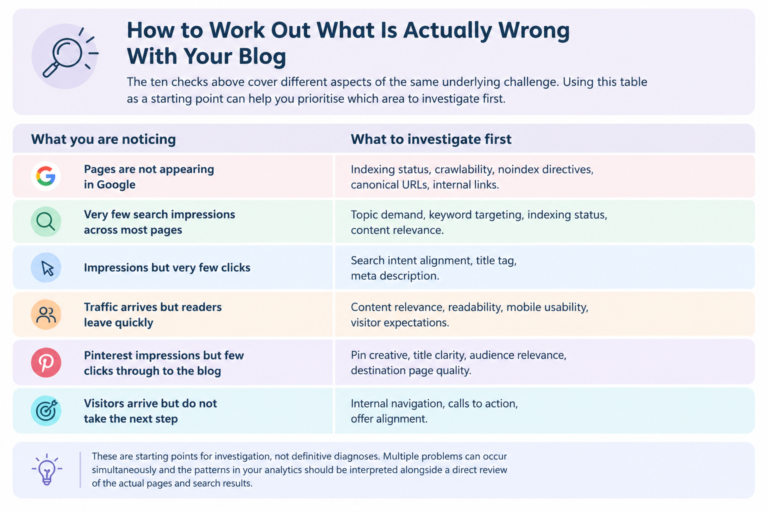
How to Work Out What Is Actually Wrong With Your Blog
The ten checks above cover different aspects of the same underlying challenge. Use this guide to identify which area to investigate first and prioritise your next steps.
| What you are noticing | What to investigate first |
|---|---|
| Pages are not appearing in Google | Indexing status, crawlability, noindex directives, canonical URLs and internal links. |
| Very few search impressions across most pages | Topic demand, keyword targeting, indexing status and content relevance. |
| Impressions but very few clicks | Search intent alignment, title tag and meta description. |
| Traffic arrives but readers leave quickly | Content relevance, readability, mobile usability and visitor expectations. |
| Pinterest impressions but few clicks through to the blog | Pin creative, title clarity, audience relevance and destination page quality. |
| Visitors arrive but do not take the next step | Internal navigation, calls to action and offer alignment. |
A note before you make changes: These are starting points for investigation, not definitive diagnoses. Multiple problems can occur simultaneously. Interpret your analytics alongside a direct review of your actual pages and search results.
A Simple 30-Day Blog Traffic Action Plan
Attempting to fix all ten issues at once is not realistic and is not necessary. Start with what the diagnostics reveal.
Week 1: Diagnose
Check your most important posts in Google Search Console. Record which are indexed and which are not. Identify which posts have impressions, which have clicks, and which have neither. Write down the three most significant problems you find. This week is about understanding what you are working with, not changing anything yet.
Week 2: Improve Content and SEO
Choose three to five priority posts based on what the diagnostics revealed. Improve search intent alignment in any post that is indexed but receiving few clicks. Add internal links to any posts with no incoming links from the rest of the site. Update content that is incomplete or outdated.
Week 3: Improve Distribution
Create Pinterest pins for two or three posts that do not yet have strong visual representation. If you have an email list, share a useful existing post with subscribers. Identify one or two relevant communities where your content would genuinely help members.
Week 4: Review and Prioritise
Compare your Search Console and Analytics data with the starting point you recorded in Week 1. What improved. What did not. What is the highest-priority action for the following month. Build the next month’s plan from what this month revealed.
Thirty days is enough time to organise the diagnostic work and begin making improvements. It is not a guaranteed timeline for significant traffic growth, particularly from organic search, which responds to changes over weeks and months rather than days.
When Individual Fixes Are Not Enough
Working through ten individual checks can identify and resolve specific issues. But some blogs are dealing with a more interconnected problem: content that is not targeting the right topics, weak internal linking across the whole site, an unclear content strategy that is pulling in multiple directions, underdeveloped Pinterest distribution, and technical or indexing problems all occurring simultaneously.
When that is the case, fixing one thing at a time without understanding how everything connects is less effective than a structured review that identifies which issues are most significant and in what order to address them.
Your blog may not need more content. It may need a clearer growth strategy.
If you are publishing consistently but struggling to attract the right visitors, a structured review can help you identify the gaps in your website, SEO, and Pinterest strategy and decide what to prioritise next.
FAQ
Why is my blog not getting traffic?
The most common causes include content that does not target topics people are actively searching for, keywords that are too competitive for a new or growing blog, posts that do not fully meet the searcher’s intent, pages that have not been indexed by Google, insufficient internal linking, and limited distribution beyond publishing. The specific cause varies by blog and requires checking the actual data rather than assuming.
How long does it take for a new blog to get traffic?
There is no reliable fixed timeline. Results depend on how specifically your content addresses topics with real search demand, how competitive those topics are, whether your posts are being indexed correctly, how useful and complete the content is, and what distribution you are doing beyond publishing. New blogs building organic search traffic through SEO typically measure meaningful progress in months rather than weeks.
Why are my blog posts not showing up on Google?
There are two different situations. The page may not be indexed, meaning Google has either not yet processed it or chose not to include it. Or the page is indexed but not ranking in a position where many searchers would see it. Check the specific URL in Google Search Console to determine which situation applies. The solutions are different for each.
How can I increase blog traffic without publishing more posts?
Improve the search intent alignment of existing posts so they better match what searchers are looking for. Add internal links between related posts so both readers and search engines can connect your content. Update incomplete or outdated posts with more specific and useful information. Distribute existing posts through Pinterest or email. Improve title tags and meta descriptions on posts that have impressions but low click-through rates.
Does Pinterest help increase blog traffic?
Pinterest can be a useful discovery channel for blogs in lifestyle, personal growth, home, travel, and related niches. Whether it drives meaningful traffic depends on whether your content matches what Pinterest’s audience is searching for, the quality of your pin creative, how clearly the pin communicates the value of the article, and whether readers who click through find what the pin promised. It is a channel worth testing for most lifestyle blogs but it is not a substitute for building organic search traffic.
Should I update old blog posts or write new ones?
Both have value and the right choice depends on the specific situation. If you have posts that are indexed and receiving some impressions but ranking below the top positions, improving them may produce faster results than publishing entirely new content. If you have significant gaps in your content coverage of important topics, new posts may be more valuable. Check the data for your specific posts rather than applying a general rule.
How do I know whether my blog needs an SEO audit?
Lorem ipsum dolor sit amet, consectetur adipiscing elit. Ut elit tellus, luctus nec ullamcorper mattis, pulvinar dapibus leo.